Seamless Pattern Planet and Star Sky: A Practical Guide for Designers and Creators
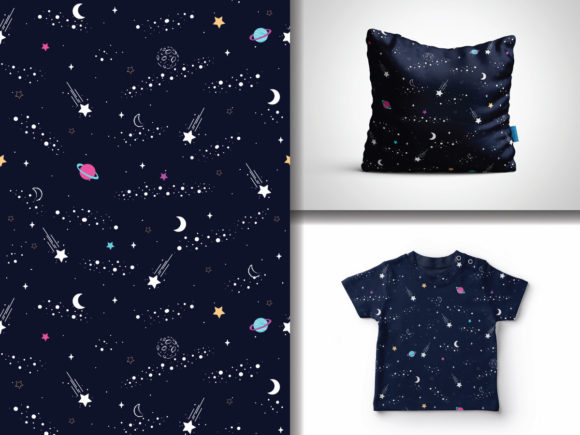
Seamless Pattern Planet and Star Sky is a curated vector illustration collection focused on cosmic themes—planets, stars, nebulae, and celestial textures—designed specifically as repeatable, editable patterns. Unlike static backgrounds or one-off illustrations, this set delivers 100 fully scalable, layered AI and EPS files optimized for professional design workflows. Each pattern is hand-drawn with intentional texture and organic variation, balancing artistic warmth with technical precision. The result sits between illustrative charm and production-ready utility—a distinction that matters when selecting resources for branding, packaging, web interfaces, or print projects.
What Sets Seamless Pattern Planet and Star Sky Apart
The defining trait of Seamless Pattern Planet and Star Sky is its dual emphasis on hand-drawn authenticity and vector flexibility. Many cosmic pattern libraries rely on photorealistic renders, procedural noise, or rigid geometric tiling. In contrast, this collection uses deliberate linework, subtle grain, and uneven planetary contours to evoke the feel of ink-on-paper sketches—yet each element remains fully editable in Adobe Illustrator. Layers are logically grouped (e.g., “Stars,” “Planet Base,” “Atmospheric Glow”), enabling targeted color shifts, scale adjustments, or component removal without breaking the seamless repeat.
Format versatility supports real-world constraints: EPS files ensure backward compatibility with older design software; JPGs offer quick preview or placeholder use; and the native AI files preserve all layers, swatches, and appearance attributes. This isn’t just about file types—it’s about reducing friction when integrating into existing asset pipelines, whether you’re prepping assets for a client’s brand refresh or building a themed product line.
How It Compares to Other Cosmic Pattern Options
When evaluating alternatives, three broad categories emerge: algorithmically generated patterns, stock photo-based repeats, and hand-crafted vector sets. Seamless Pattern Planet and Star Sky belongs firmly in the third group—but with notable refinements.
- Algorithmic or AI-generated patterns often produce high-resolution, infinitely variable results but lack consistent visual language. You might get a stunning nebula texture, but pairing it with a matching planet motif requires manual curation—or tolerance for mismatched styles. Seamless Pattern Planet and Star Sky avoids this by offering cohesive, pre-harmonized elements across all 100 patterns.
- Stock photo-based seamless backgrounds (e.g., tiled astrophotography) deliver realism but suffer from resolution limits, copyright ambiguity, and inflexibility. Scaling beyond original dimensions risks pixelation; recoloring requires destructive raster editing. With Seamless Pattern Planet and Star Sky, resizing is lossless, and color changes happen at the swatch level—not through layer masks or hue/saturation sliders.
- Generic vector pattern packs may include stars or planets as isolated icons, not true seamless repeats. That means extra time spent building tiles manually—adjusting spacing, aligning edges, testing continuity. Every pattern in Seamless Pattern Planet and Star Sky has been tested for edge alignment and visual rhythm, saving hours of trial-and-error.
Strengths and Real-World Fit
The strongest use cases align with needs for both aesthetic distinctiveness and technical reliability. For example:
- A children’s book designer creating a space-themed activity kit benefits from the hand-drawn quality—it feels approachable and imaginative, not cold or overly digital.
- A packaging team developing limited-edition astronomy-themed teas can apply different color variations (deep indigo + gold, soft lavender + cream) across product SKUs using the same base pattern—ensuring brand consistency without commissioning new artwork.
- An educator designing printable classroom posters gains flexibility: they can isolate individual planets for labeling exercises or use full repeats as engaging background textures—all from the same file.
Unlimited color variations aren’t just marketing language here. Because each shape lives on its own layer with editable fills and strokes, swapping palettes takes seconds—not minutes. You’re not limited to preset swatches; you define your own CMYK or Pantone values, adjust opacity for overlay effects, or convert to grayscale for embossed print treatments.
Tradeoffs and Limitations to Consider
No resource fits every scenario—and understanding where Seamless Pattern Planet and Star Sky falls short is as important as knowing where it excels.
First, it’s intentionally non-photographic. If your project demands realistic star fields with accurate stellar magnitude distribution or lens flare simulation, this set won’t meet that need. Similarly, it doesn’t include animated variants or 3D extrusions—those require separate tools or services.
Second, while the hand-drawn style adds warmth, it also introduces slight irregularity. For applications requiring absolute symmetry—like precision engineering schematics or scientific visualization—the organic variance may be undesirable. In those cases, mathematically precise geometric patterns or parametric designs would be more appropriate.
Third, the focus remains strictly on planetary and stellar motifs. You won’t find comets, spacecraft, constellations as connect-the-dots lines, or deep-space phenomena like pulsars or accretion disks. The scope is deliberately narrow to ensure depth over breadth.
When to Choose Seamless Pattern Planet and Star Sky—and When Not To
Choose Seamless Pattern Planet and Star Sky if:
- You value editable, layered vector files over flat raster assets;
- Your workflow includes frequent color experimentation or adaptation across media (print, web, merch);
- You prefer tactile, human-made aesthetics over hyper-realism or sterile minimalism;
- You need reliable tiling behavior without manual patching or scripting;
- You’re working under deadlines and want predictable, test-ready outcomes—not iterative AI generations needing refinement.
Consider alternatives if:
- Your priority is ultra-high-fidelity realism (e.g., NASA-style visualizations);
- You need dynamic, data-driven patterns that respond to input variables;
- You’re building interactive experiences requiring SVG animation or responsive scaling logic;
- Your brand guidelines mandate strict geometric uniformity or monoline simplicity;
- You only need one or two patterns—not a comprehensive library for ongoing use.
Practical Integration Tips
To maximize utility, start by exploring the layered structure in Illustrator before applying global changes. Try locking layers you don’t intend to modify (e.g., “Background Stars”) while adjusting only foreground elements like planetary rings or glow effects. Use the Recolor Artwork tool with the “Edit” tab to maintain relative contrast when shifting palettes—especially helpful when adapting dark-mode interfaces.
For print, verify overprint settings on layered elements to avoid unintended knockout effects. And remember: because these are vector-based, you can export individual components as SVG for web use—no need to rasterize unless required for legacy CMS constraints.
Finally, treat the collection as a foundation—not a final output. Its strength lies in adaptability: combine patterns with custom typography, integrate them into larger layouts using clipping masks, or use them as texture overlays on photography. The hand-drawn origin invites reinterpretation, not rigid adherence.